Coaching agent replies in Zoho SalesIQ: what's built in, and what isn't
Support Coach · September 2026
Zoho SalesIQ gives your team real tools around reply quality — canned responses, writing help the agent can trigger by hand, and supervisor monitoring — but nothing that intervenes when an agent is about to send a reply they shouldn't. If your team runs live chat on SalesIQ and you've wondered how to coach reply quality before the customer sees the message, this page maps where the gap is and how to close it.
What you can already do in SalesIQ
- Canned responses keep known answers consistent and fast.
- Manual writing assistance exists for the agent who selects their text and asks for help polishing it.
- Monitoring and transcripts let a supervisor watch live chats or read them afterwards — good for spot-checks and training, but a supervisor can't watch every chat as it happens, and the risky reply doesn't schedule itself for the moment someone's watching.
All of it is useful. None of it acts at the moment that decides everything: the seconds between typing a risky reply and hitting send. That's as true for a team of one as for a team of fifty — one blame-worded reply reaching one customer is the whole cost, and no amount of after-the-fact review or on-request polish undoes it.
The gap: nobody catches the reply the agent is sure about
The messages that damage customer relationships share a pattern: the agent was confident. "You entered it wrong." "That's not something we support." "As I already explained." An agent typing those isn't selecting their text and asking for a polish — they think the reply is fine. Monitoring doesn't catch it either, unless a supervisor happens to be watching that exact chat at that exact second.
So the honest summary of the built-in options: they help agents who know they want help, and let managers review what already happened. What's missing is the layer that speaks up uninvited, in the seconds between typing and sending.
Closing the gap with pre-send coaching
A pre-send coaching extension sits inside the SalesIQ operator window and watches the agent's draft — not the customer's messages — as it's typed:
- Instant hints flag clear risks (blame, a refusal with no alternative) with no AI and no delay.
- A coaching card appears when the agent pauses, offering a better version alongside their draft.
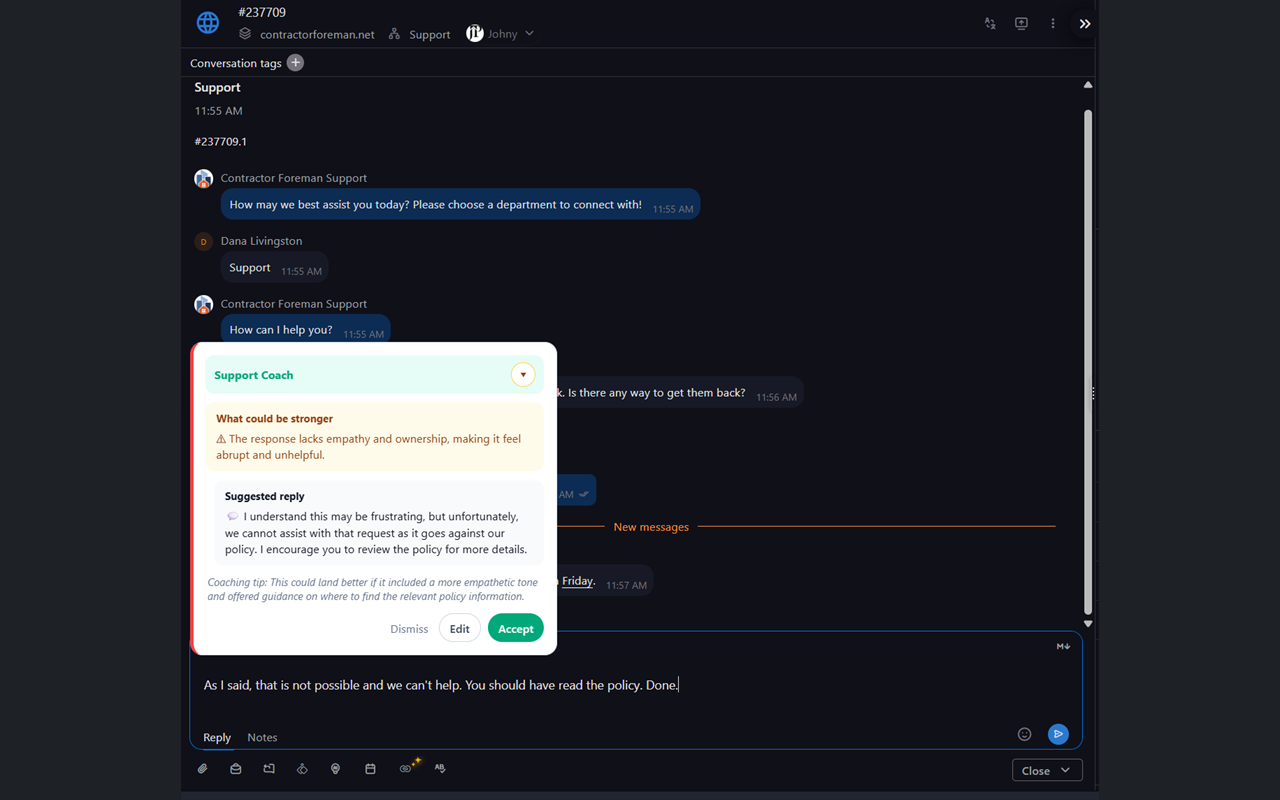 The coaching card in a SalesIQ chat: the agent's own draft stays untouched below; the
suggestion is one click to accept or dismiss.
The coaching card in a SalesIQ chat: the agent's own draft stays untouched below; the
suggestion is one click to accept or dismiss.
- A pre-send check — one click — scores the draft across eight dimensions (empathy, ownership, next step, tone, and more) and produces a rewrite in your company's voice, ready to send or edit.
- A weekly manager summary shows what the team was coached on — without anyone reading transcripts.
Because it reads only the draft, the customer's side of the conversation never leaves the browser — which keeps the IT conversation short for a tool an agent installs in two minutes.
Support Coach is a pre-send coaching extension built on Zoho SalesIQ first — our own support team has used it there daily since March 2026. It works on any SalesIQ plan. $15 per agent per month, 14-day free trial, no card: supportcoach.io/extension.
FAQ
Does Zoho SalesIQ have built-in reply review before sending? No. Agents can ask for writing help on text they select, and supervisors can monitor chats, but nothing evaluates a draft automatically before it's sent.
Does a coaching extension need admin access to our Zoho account? No. It runs in the agent's browser on the operator window. There's nothing to install server-side and no Zoho configuration to change.
Will it work with our canned responses? Yes — it's a layer on top of the composer, not a replacement for anything. Canned responses still fire; the coach checks whatever ends up in the draft.
Does it read our customers' messages? No. It evaluates only the reply the agent is drafting. Customer messages never leave the browser.